
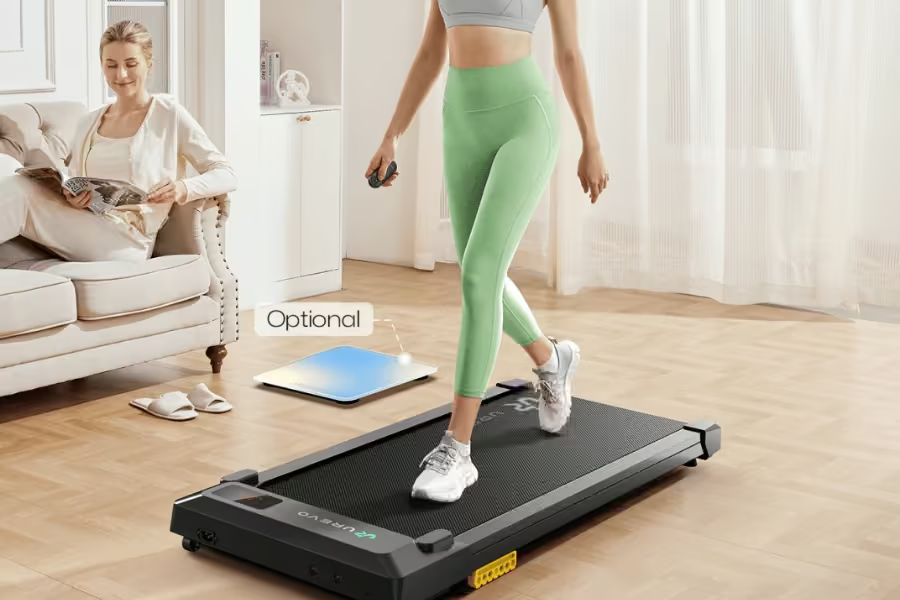
If you work from a standing desk, you’re already ahead of the curve — you know that staying upright beats slumping in a chair for eight hours straight. But here’s the thing most standing desk owners eventually figure out: standing still all day isn’t much better than sitting. Your legs stiffen, your lower back grumbles, and by 3 p.m. you’re back in the chair. A walking pad changes that equation entirely. Park it under your desk, set a comfortable pace, and suddenly your workday involves actual movement — without ever leaving your workspace.
We dug deep into this category, poring over real-world reviews from fitness experts, remote workers, and everyday users who’ve clocked hundreds of hours on these machines. Not every walking pad is cut out for desk use: some are too loud for video calls, too bulky to slide under a standard desk frame, or designed with runners in mind rather than steady two-mile-per-hour typists. The seven picks below clear every practical hurdle — quiet motors, compact profiles, honest weight ratings, and controls you can operate without looking down at your feet.
Whether you’re chasing 10,000 daily steps, managing a bad back, or simply want to feel more alive by lunchtime, there’s a walking pad in this guide for your setup and your stride. Here’s what we tested, what we loved, and — crucially — what we’d skip.
📋 Table of Contents
- UREVO E4W Smart Walking Pad (Wood Grain) — Best Overall
- DeerRun Q1 Walking Pad w/ 6% Incline — Best with Incline
- Redliro Wood Walking Pad 300 lb — Most Stylish Budget Pick
- Funmily 3-in-1 Walking Pad 300 lb — Best Versatile Pick
- Goplus Walking Pad 2.5HP 265 lb — Best Compact Pick
- UREVO 2025 Smart Walking Pad (MIIT) — Best Smart Features
- Full Comparison Table
- Buyer’s Guide
- FAQ
Walking Pad vs. Treadmill: What’s the Difference?
A walking pad (sometimes called an under-desk treadmill) is a slim, motorized belt platform designed specifically for slow, steady walking — typically topping out between 3.5 and 4 mph. They have no upright handles or console tower, which is what allows them to slide underneath a standing desk while you work. They’re optimized for low-intensity, sustained use, and many models weigh under 60 lbs for easy repositioning.
A treadmill, by contrast, is built for cardio workouts — running, incline training, interval programs. These have consoles, safety rails, and motors designed for high-speed, high-impact use. They’re too tall and too large to use under a desk, and they’re generally not built for the quiet, continuous low-speed operation that desk work demands.
If your goal is staying active during your workday — not training for a 5K during your lunch break — a walking pad is almost always the right tool.

UREVO E4W Smart Walking Pad — Wood Grain
View on AmazonThe UREVO E4W is the walking pad we’d recommend to most standing-desk workers without hesitation. It threads a rare needle: the warm wood-grain finish looks like home office furniture rather than gym equipment, while the performance specs hold up for daily all-day use. In a category where most machines look like lumps of black plastic, the E4W’s aesthetic alone is a meaningful differentiation.
The 2.5 HP quiet brushless motor is engineered for sustained low-speed operation — the kind of use walking pads actually see — with measured noise levels under 45 dB at walking speeds. That means you can take video calls without your mic picking up the machine. The 15″ × 40.2″ belt rides on an 8-point silicone shock absorption system that cushions each step and reduces the leg fatigue that builds up over long sessions on cheaper flat-deck pads.
Control is flexible: the UREVO app handles session tracking, MIIT workout templates, and Bluetooth speed adjustment. The magnetic remote control sticks to the machine frame when not in use — solving the near-universal “lost the remote mid-meeting” problem. Setup is plug-and-play with zero assembly. The compact footprint (approximately 42.7″ × 19.7″ × 4.5″) and transport wheels make single-person repositioning easy.
✔ What We Like
- Wood-grain finish looks like furniture, not a gym machine
- Under 45 dB — genuinely safe for video calls
- 8-point shock absorption for sustained joint comfort
- Magnetic remote sticks to machine — won’t be lost
- MIIT workout modes via app for fitness-minded users
- Zero assembly — plug in and walk immediately
✘ Worth Noting
- 265 lb weight limit — not suitable for heavier users
- 4 mph ceiling — walking only, no jogging
- Wood finish requires occasional care to avoid surface scuffs

DeerRun Walking Pad — 6% Incline, 2.5HP, 300 lb
View on AmazonMost under-desk walking pads are completely flat — and ergonomists usually recommend keeping it that way for sustained desk-walking, since incline shifts your posture out of neutral. But if you want the option to crank the difficulty for a dedicated workout session on the same machine, the DeerRun Q1’s 6% manual incline unlocks meaningful calorie burn beyond what a flat pace delivers, without requiring a second, separate treadmill purchase.
DeerRun ships this pad fully assembled — unbox it, plug it in, and walk. The 2.5 HP motor runs quietly across the 0.6–3.8 mph speed range, and the 300 lb weight capacity puts it among the stronger options at this tier. What separates DeerRun from generic Amazon pads is the PitPat app ecosystem: virtual racing challenges, community competitions with cash prizes, AI coaching prompts, and cloud backup of your workout history. It turns passive step accumulation into something genuinely engaging.
The machine weighs 43 lbs, stores flat under furniture or upright against a wall, and includes a physical remote for hands-off speed adjustment. The 15.4″ × 39.4″ belt is compact but functional at desk-walking speeds. One noted friction point: the PitPat app requires an initial setup step the first time you power on — a minor inconvenience that’s a one-time process, not an ongoing annoyance.
✔ What We Like
- 6% incline adds standalone workout capability
- 300 lb capacity at a mid-range tier
- Ships fully assembled — truly zero setup
- PitPat app with virtual races and community challenges
- 43 lbs with wheels — easy single-person repositioning
✘ Worth Noting
- PitPat app required for first-time unlock step
- Belt is compact — shorter strides at top speed may feel cramped
- Incline is manual — not motorized or auto-adjusting

Redliro Wood Walking Pad — 300 lb
View on AmazonIf you want the wood-grain home office aesthetic but want to spend less than the UREVO E4W, the Redliro Wood Walking Pad delivers that look with confirmed real wood construction — not a printed laminate or plastic overlay. Reviewers and independent testers have confirmed the wood is genuine, with unique grain patterns on each unit. The warm finish reads as furniture rather than fitness equipment, which matters in a home office where the walking pad is perpetually visible.
The 2.25 HP motor keeps noise levels quiet enough for home office use, and the 5.11″ profile slides under most standing desks without clearance issues. Despite weighing just 45 lbs, the frame supports up to 300 lbs — a capacity that speaks to the quality of the alloy steel structure beneath the wood exterior. Front transport wheels allow easy single-person repositioning. The LED display tracks steps, speed, time, distance, and calories, with a data-memory function that saves your progress during short breaks rather than resetting your session count.
The Redliro Wood is best suited for users walking 1–2 hours per day at moderate speeds. The 0.5″ deck thickness is appropriate for home use and intermittent desk-walking sessions, but it isn’t rated for the kind of 6–8 hour sustained daily deployment that heavy commercial-grade machines handle. For most remote workers getting their steps in between meetings, that’s a perfectly adequate use case.
✔ What We Like
- Verified real wood construction — not plastic or laminate
- 300 lb capacity at an accessible price tier
- Data-memory keeps workout stats during short breaks
- 45 lbs with transport wheels — easy to move
- Slim 5.11″ profile fits under virtually any desk
✘ Worth Noting
- Best for 1–2 hrs/day — not for all-day office deployment
- Speed transitions slightly slower than premium models
- No app connectivity on base model

Funmily 3-in-1 Walking Pad — 2.5HP, 300 lb
View on AmazonThe Funmily 3-in-1 brings structured flexibility to the walking pad category: three distinct speed modes that let you adapt the machine to different moments in your workday. Working Mode (0.5–1.5 mph) is calibrated for active typing and video calls — slow, steady, unobtrusive. Walking Mode (0.5–2.5 mph) covers more intentional fitness-focused movement. Running Mode (2.5–4 mph) handles brisk walking sessions when you’re ready to step away from the keyboard and focus purely on moving.
The 2.5 HP motor handles all three modes consistently, and the 300 lb weight capacity means the machine isn’t straining at the top of its structural range for most users. The HD LED display — a genuine improvement over the standard low-contrast LED panels on cheaper pads — shows speed, distance, time, calories, and steps in a format that’s readable without squinting at the floor. A physical remote handles all speed adjustments in the moment.
Funmily ships this fully assembled. The compact design with transport wheels stores easily under a desk, bed, or sofa. Customer service is active on the Amazon listing with consistent responses in the review section, which is a useful proxy for how warranty inquiries get handled. For a standing-desk worker who wants one machine that explicitly adapts to different use cases throughout the day, this is the most deliberately structured option in the guide.
✔ What We Like
- 3 purposeful speed modes tuned for different use cases
- 300 lb capacity with a 2.5 HP motor for sustained reliability
- HD LED display — noticeably clearer than standard panels
- Fully assembled — unbox and walk immediately
- Active brand customer service on Amazon listing
✘ Worth Noting
- 4 mph “running” mode is a brisk walk — not true jogging
- Growing brand — less long-term owner review depth than established names
- No incline option

Goplus Walking Pad 2.5HP — 265 lb Compact
View on AmazonWhere the Goplus 300 lb model prioritizes capacity, this 265 lb sibling trades a bit of weight ceiling for a lighter, more compact footprint — making it the better fit for users who reposition their walking pad frequently, have tighter desk clearance, or prefer a machine that feels less physically imposing to carry and store. The reduction in capacity doesn’t mean a reduction in motor quality: the 2.5 HP brushless unit runs at under 45 dB, which holds up for call use.
The three countdown modes are the headline differentiator here — time-based, distance-based, or calorie-based goal tracking that turns passive step accumulation into intentional targeted sessions. Set a 30-minute countdown or a 2-mile goal, and the machine tracks your progress toward that specific target rather than just displaying accumulating numbers. It’s a small feature that makes a real difference to how motivated you stay during a session. Speed runs 0.6 to 4 mph, covering the full desk-walking range cleanly.
The 7-layer anti-slip diamond belt is the same spec as the larger Goplus model — reliable grip regardless of footwear. LED display and remote included. No app, no Bluetooth, no subscription dependency — just a remote-controlled pad that does its job reliably. Installation-free, out-of-box ready.
✔ What We Like
- 3 countdown goal modes for intentional, targeted sessions
- Under 45 dB — confirmed call-friendly noise level
- More compact and lighter than the 300 lb Goplus sibling
- 7-layer anti-slip belt for confident footing
- No app required — remote-and-display simplicity
✘ Worth Noting
- 265 lb capacity — check your weight against this before buying
- No app connectivity for long-term session history tracking
- No incline

UREVO Smart Walking Pad — HiveTech MIIT
View on AmazonUREVO’s 2025 walking pad upgrade introduces two features worth paying attention to. The first is HiveTech cushioning — a honeycomb-structured shock absorption layer that distributes stride impact more evenly across the deck surface than traditional silicone point absorbers. After a few hours of walking, the difference in leg and joint fatigue is noticeable compared to standard-cushion pads. The second is built-in MIIT (Moderate Intensity Interval Training) workout templates in the companion app: the treadmill speed adjusts automatically through structured interval cycles without you having to manually change settings mid-session.
The 2.5 HP motorized drive maintains consistent performance from the slow 0.6 mph desk-walking pace through the 4 mph ceiling. App-connected tracking provides real insights into walking efficiency — not just step counts, but pace consistency and session data that integrates with your fitness goals. The magnetic remote control eliminates the lost-remote problem that frustrates users of other designs. Plug-and-play setup, zero assembly, and a contemporary rounded-front aesthetic that looks at home in a modern office.
This is the pick for the fitness-minded standing desk worker who wants their desk walking to be a meaningful component of a structured health plan — not just passive step accumulation. If you track metrics seriously, use wearables, and want your walking pad to deliver data beyond basic session time, the 2025 UREVO smart pad is the most capable machine in this roundup.
✔ What We Like
- HiveTech honeycomb cushioning — superior sustained joint comfort
- MIIT interval programs with automatic speed adjustments via app
- Magnetic remote — eliminates the lost-remote problem
- Contemporary 2025 design suitable for visible home office placement
- Plug-and-play — fully assembled and ready to use
✘ Worth Noting
- App required for MIIT and advanced tracking features
- 4 mph ceiling — not suited for running sessions
- 2025 model — less long-term owner review depth than older listings
Side-by-Side Comparison
| Model | Motor | Max Speed | Weight Limit | Incline | App / Control |
|---|---|---|---|---|---|
| UREVO E4W (Wood) | 2.5 HP brushless | 4 mph | 265 lbs | No | UREVO App + remote |
| DeerRun Q1 (6% Incline) | 2.5 HP | 3.8 mph | 300 lbs | 6% manual | PitPat App + remote |
| Redliro Wood | 2.25 HP | 4 mph | 300 lbs | No | Remote only |
| Funmily 3-in-1 | 2.5 HP | 4 mph | 300 lbs | No | App + remote |
| Goplus 265 LB Compact | 2.5 HP brushless | 4 mph | 265 lbs | No | Remote only |
| UREVO 2025 MIIT Smart | 2.5 HP | 4 mph | 265 lbs | No | UREVO App (MIIT) + remote |
Buyer’s Guide: What to Look For
Motor Quality & Quiet Operation
For desk use, noise matters as much as power. Brushless motors run quieter, cooler, and longer than brushed alternatives. Machines rated under 45 dB are comfortable for video calls — that threshold is where most call platforms’ noise suppression can mask what remains. Peak HP ratings are mostly marketing; what matters for desk walking is sustained low-speed torque at 1–2 mph, which is where you actually spend your time.
Belt Size
Minimum comfortable belt width for desk walking is 15 inches — anything narrower and you’ll feel the side rails at your feet. Length of 39–42 inches is adequate for most people at desk-walking speeds. Taller users (6’1″+) with longer natural strides should look for 40″+ belt length. At 1.5 mph, you don’t need a 60″ running treadmill deck — but you do need enough room to walk naturally without a shuffling gait.
Weight Capacity
Capacity ratings signal structural quality, not just safety. A pad rated for 300 lbs uses heavier-gauge steel that creates a more stable walking feel for everyone. The practical rule: choose a machine rated at least 20–30% above your actual weight. Running a motor and frame at their limit shortens their lifespan significantly — that’s where the early mechanical failures typically originate on cheaper, undersized pads.
Profile Height & Desk Clearance
All seven pads in this guide stand 4–6 inches high when deployed. Most height-adjustable standing desks lower to around 27–30 inches. Subtract the pad height from your desk clearance and make sure you have comfortable leg movement room above the belt. When in doubt, measure before you order — the spec is almost always in your desk’s documentation. A pad that doesn’t fit under your specific desk is genuinely useless.
Controls: Remote vs. App vs. Both
You should never need to crouch down to the deck to change speed during a work session. A physical remote is non-negotiable — ideally magnetic so it stays attached to the machine. App control is a valuable addition for session history and goal tracking, but it shouldn’t be the only option; network connectivity issues or phone battery should never strand you without speed control. Remote-first designs are the most reliable for daily office use.
Storage & Portability
If you move your walking pad frequently — different rooms, packing away for the weekend — weight and wheel quality matter. Most pads here weigh 40–50 lbs and roll on rear transport wheels. Pads under 45 lbs can typically be repositioned by one person without strain. For users who place their pad once and leave it, weight matters less than motor reliability and belt quality. Measure your storage space before buying, particularly for pads that don’t fold.
💡 Pro Tip: The Two-Week Ramp for New Desk Walkers
Walking while working is a skill that takes roughly a week to internalize. Your first few days, stay at 1–1.5 mph and limit sessions to 20–30 minutes before a break. Typing accuracy will dip slightly as your brain adjusts — this is normal and resolves quickly for most people. By day 10, most desk walkers report that 1.5 mph feels completely natural during emails and calls. A practical workflow that experienced users recommend: schedule walking time for lower-cognitive tasks (emails, reading, listening to recordings, Slack messages) while reserving focused writing, complex spreadsheets, and detailed design work for standing-still or seated periods. You get the movement benefit without the concentration cost.
